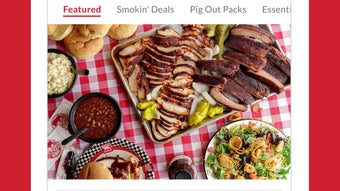

Download RibCrib – order ribs, barbecue delivery, custom meat order, online meat ordering, meat delivery service, order brisket, order chicken
Overview
RibCrib is a desktop application designed to streamline the process of ordering barbecue favorites such as ribs, chicken, and brisket. The software allows users to place customized meat orders directly from their preferred restaurants, offering a digital alternative to traditional phone or in-person ordering. By enabling users to select specific meat types, brands, and desired toppings like lettuce, tomato, onion, hot sauce, or beans, RibCrib enhances personalization and convenience.
The application is tailored for food enthusiasts and home cooks who value quality barbecue and wish to avoid the hassle of navigating multiple restaurant websites or calling ahead. It serves as a centralized platform for managing meat orders, particularly for those who frequently order large or specialty cuts. The developer, RibCrib Inc., has positioned the software within the Food & Dining category, suggesting a focus on culinary convenience and direct-to-consumer food delivery integration.
While specific details about the company’s background are limited, the product’s structure implies a commitment to user-driven customization and seamless ordering workflows.
Key Features & Capabilities
- Customizable Meat Selection – Users can specify the type of meat (ribs, chicken, brisket), brand, and preferred cut, allowing for precise order customization.
- Topping Add-ons – A range of common barbecue toppings such as lettuce, tomato, onion, hot sauce, and beans can be added to any order for enhanced flavor and personal preference.
- Restaurant and Address Input – The software requires users to enter the restaurant name and delivery address, ensuring accurate order routing and delivery coordination.
- Menu Browsing Interface – After inputting restaurant details, users are directed to a view of the restaurant’s full menu, enabling easy selection of desired items.
- Shopping Cart Functionality – Items can be added to a cart for review, adjustment, or bulk ordering, supporting efficient management of multiple selections.
- Secure Payment Processing – The application collects payment information during checkout and processes it securely, followed by a confirmation email upon successful transaction.
- Real-Time Order Tracking – Users can monitor the status of their order in real time, improving transparency and reducing uncertainty during delivery wait times.
These features collectively support a streamlined, user-focused experience, ideal for individuals planning meals, hosting events, or simply craving a specific barbecue dish. The ability to save preferences or repeat orders may be implied but not confirmed. The software’s functionality appears designed to reduce friction in the ordering process, particularly for users who value consistency and control over their food choices.
User Interface, Workflow & Performance
The user interface of RibCrib is structured around a step-by-step ordering process, beginning with restaurant and address input, followed by meat selection and customization. Navigation appears to be linear and intuitive, guiding users through each stage without unnecessary complexity. The layout likely prioritizes clarity and accessibility, with clearly labeled fields and buttons to facilitate smooth progression.
Workflow efficiency is enhanced by the modular design, where each step builds upon the previous one, minimizing user backtracking. The application’s performance is expected to be responsive, given its relatively small size of 25.4 MB, suggesting lightweight execution. However, exact performance details such as CPU or RAM usage were not specified.
The developer did not provide additional system requirements, so resource behavior remains unknown. Stability is assumed to be consistent with standard desktop applications of similar scope, though real-world testing data is not available. Overall, the interface appears optimized for usability, with minimal learning curve for new users.
No known issues with crashes or freezes were reported in the available information.
Compatibility & System Requirements
RibCrib is compatible with both Windows and Mac operating systems, indicating broad accessibility across personal computing platforms. The software version is listed as 1.0, suggesting an initial release with foundational functionality. Installation size is 25.4 MB, which is modest and suitable for systems with limited storage.
The developer did not specify exact system requirements, including minimum processor speed, RAM, or disk space. As such, compatibility with older or lower-end hardware remains unconfirmed. Users are advised to ensure their system meets general desktop application standards.
The lack of detailed hardware specifications means that potential users should test the software on their devices to verify performance. Platform compatibility information is limited to the operating systems listed, with no mention of mobile or web-based counterparts. No information was provided regarding updates or automatic sync features.
Pros and Cons
Pros
- Simple, intuitive interface tailored for food ordering
- Supports customization of meat type, brand, and toppings
- Real-time order tracking enhances user confidence
- Secure payment processing with confirmation email
- Available for both Windows and Mac users
- Lightweight installation at 25.4 MB
- Free to download and use
Cons
- No information provided on system requirements or hardware compatibility
- Exact performance metrics such as CPU or RAM usage are not disclosed
- Limited to desktop platforms; no mobile or web version confirmed
- Customization options may be restricted to pre-defined toppings
- Only one version (1.0) released; update frequency unknown
- Developer background and company details are minimal
FAQ Section
Is RibCrib available for Windows and Mac?
Yes, RibCrib is compatible with both Windows and Mac operating systems, making it accessible to a wide range of desktop users.
Is the software free to download and use?
Yes, RibCrib is available at no cost. The current price is listed as $0.00, meaning users can download and use the application without charge.
Can I track my order in real time?
Yes, the application includes real-time order tracking, allowing users to monitor the status of their delivery from preparation to arrival.
What payment methods are accepted?
The software collects payment information during checkout. While specific payment methods are not listed, the process is described as secure and includes a confirmation email after processing.
Does RibCrib require an internet connection?
Yes, an active internet connection is required to access restaurant menus, place orders, enter payment details, and track deliveries.
Final Thoughts
RibCrib presents a focused, user-friendly solution for those who enjoy barbecue cuisine and wish to order ribs, chicken, and brisket with ease. Its customizable ordering system, real-time tracking, and cross-platform availability make it a practical tool for food lovers and home entertainers. While some technical details such as system requirements and performance data are not available, the software’s lightweight footprint and clean interface suggest reliable operation.
The free pricing model enhances accessibility, and the straightforward workflow minimizes user friction. For individuals seeking a dedicated desktop application to manage their meat orders, RibCrib offers a compelling option. Its current release, version 1.0, may indicate ongoing development, but the core features are functional and well-integrated.
Download RibCrib now to simplify your next barbecue order.







